


Adding Accessories Script for Bazis-Mebelshchik - PLUG-IN License - Windows



- New
Adding Accessories Script for Bazis-Mebelshchik - Plug-in License
This is a JavaScript script for Bazis-Mebelshchik, the furniture design software of the Bazis product line, written by an independent author rather than by the software developer. It helps furniture makers who design cabinets and kitchens in Bazis-Mebelshchik add hardware items to a project quickly, without inserting every item by hand. The purchase is an archive with the script file; it extends an existing installation of Bazis-Mebelshchik and does not include the program itself.
This product is a license for the Adding Accessories Script for Bazis-Mebelshchik plug-in for a number of users not stated by the supplier (Windows). The supplier does not state the duration of the license, so no specific validity period is guaranteed. The license is delivered by email with the activation instructions.
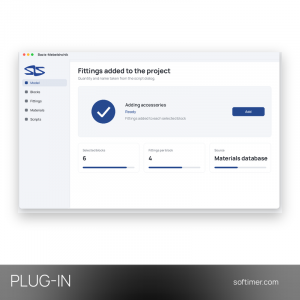
When a project needs items such as handles, hinges or connectors to appear in the parts and materials lists, the script adds them as fittings without geometry in the quantity you enter. If several blocks are selected, the same set is added to each of them, which is useful when a kitchen or wardrobe is made of many similar modules.
Key Features:
- Fittings with a set quantity: The script adds fittings without geometry to the project in the quantity you enter in its dialog.
- Addition to selected blocks: When blocks are selected, the fittings are added to every one of them instead of to the project as a whole.
- Name from the materials database: The name of the item can be picked from the Bazis-Mebelshchik materials database, so it matches the existing records.
- Manual name entry: If the item is not in the database, its name can simply be typed in by hand.
- Simple installation: The script is a single JavaScript file that is placed in the scripts folder and started like any other script.
Product Details:
- Product: Adding Accessories Script for Bazis-Mebelshchik
- Version: current version at the time of purchase
- License Type: plug-in license; duration not stated by the supplier
- Platform: Windows
- Devices: number of users not stated by the supplier
- Language: Russian (Bazis-Mebelshchik interface)
- Delivery: archive with the JavaScript script file sent by email after payment confirmation (no license key)
- Activation: no activation required
- Region: not specified – if you need activation in a specific country, contact us before ordering
- Notes: This is a JavaScript script file for Bazis-Mebelshchik (declared compatible with versions 10-22), not a licence key: unzip it into your Bazis scripts folder
- Publisher: Independent script author (not Bazis-Center)
System Requirements:
- Host software: An installed and licensed copy of Bazis-Mebelshchik, versions 10 to 22 according to the script author
- Operating system: Windows, as required by Bazis-Mebelshchik
How to Activate:
- Download the archive received with your order and unpack it.
- Copy the unpacked JavaScript file into the folder where Bazis-Mebelshchik keeps your scripts.
- Open Bazis-Mebelshchik and a model, then start the Adding accessories script from the list of scripts.
Delivery:
This product is delivered digitally. After your purchase is confirmed, the license key and activation guidance are sent to the email address provided at checkout. Delivery times may vary depending on the product type.
Same products


- New


- New


- New


- New

- New
- New


- New


- New


- New
Feedback
This product has no reviews. Be the first to review this product!
Share your opinion about the product
This will help other buyers make purchasing decisions
Write a review