


Paragon Microsoft NTFS for Mac - Lifetime License KEY - Mac


- New
Paragon Microsoft NTFS for Mac - Perpetual License
Microsoft NTFS for Mac by Paragon Software is a file system driver from the German company Paragon Software GmbH that lets macOS read and write NTFS volumes, the disk format used by Windows. It is intended for anyone who exchanges data between a PC and a Mac: without a driver macOS can only read NTFS disks, so files on a Windows-formatted external drive, USB stick or memory card cannot be saved, renamed or deleted from a Mac. This listing is an activation key for the software: once activated, the driver mounts every NTFS volume connected to the Mac with write access and works quietly in the background.
This product is a perpetual license key for Paragon Microsoft NTFS for Mac: it does not expire and can be used on 1 Mac running macOS. The key is delivered by email together with the activation instructions.
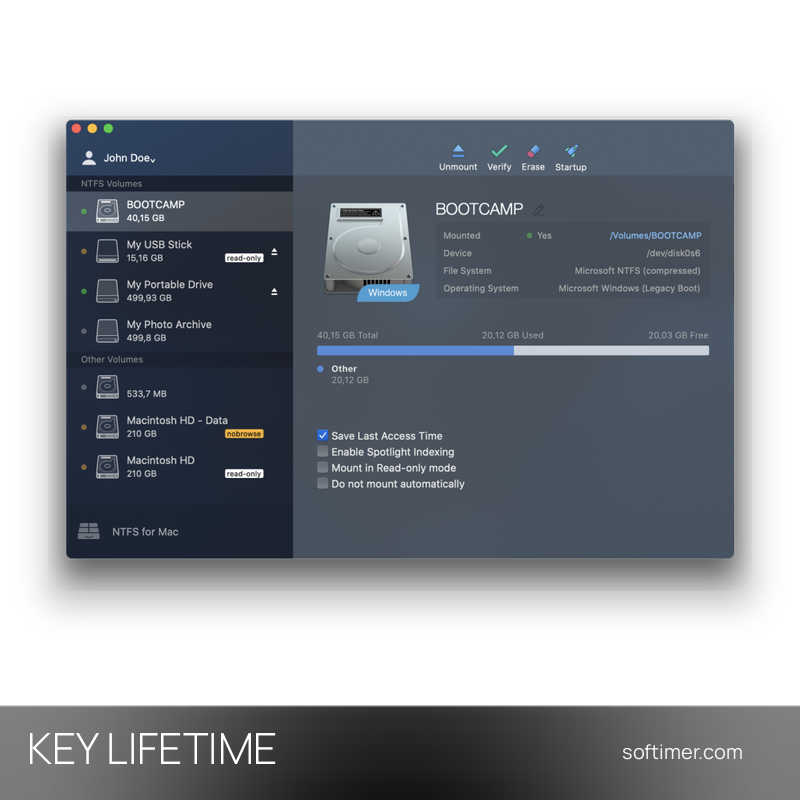
A common case is an external hard drive or SSD shared between a Windows PC and a Mac, or a Boot Camp partition you want to edit from macOS. The driver also works with NTFS disks used inside virtual machines and with encrypted volumes managed by third-party tools.
Key Features:
- Full read and write access: NTFS volumes mount with write permission: create, edit, copy, move, rename and delete files on Windows-formatted disks directly from the Finder.
- Transfer speed close to native: The driver is built for speed and moves data at rates comparable to the native macOS file system, with no limit on file size, so large video files and databases are handled without trouble.
- Automount and menu bar item: Supported volumes are mounted automatically at startup and can be reached from the menu bar; automount can be turned off for any single disk in the program.
- Volume management: The application formats, checks and repairs NTFS volumes, sets a volume as startup disk and shows mount point, device name, used space and options such as read-only mode or Spotlight indexing.
- Intel and Apple Silicon: Runs on Intel Macs and on Apple Silicon machines (M1 and later) with current macOS releases; all NTFS versions from Windows NT 3.1 to Windows 11 are supported.
- Boot Camp and virtualization: Compatible with Apple Boot Camp and with virtualization and encryption software such as VMware Fusion, Parallels Desktop and TrueCrypt; file names in non-Latin alphabets are handled correctly.
Product Details:
- Product: Microsoft NTFS for Mac by Paragon Software
- Version: current version at the time of purchase; updates according to the vendor's policy
- License Type: perpetual license key, no expiry
- Platform: macOS
- Devices: 1 Mac
- Language: Multilingual (English, German, French, Italian, Russian and other languages)
- Delivery: license key and instructions by email after payment confirmation (usually within a few hours)
- Activation: activation key entered in the application after installation (Activate button); the installed copy is linked to the Mac and can be released from the Paragon account to move it to another computer
- Publisher: Paragon Software GmbH
System Requirements:
- Operating System: macOS 10.15 Catalina or later (Big Sur, Monterey, Ventura, Sonoma, Sequoia, Tahoe and the current release)
- Processor: Intel Mac or Apple Silicon Mac (M1, M2, M3, M4 and later)
- Permissions: Administrator account to install the driver and allow its system extension in Privacy and Security
How to Activate:
- Download the installer from the Paragon Software website, run it and follow the steps; allow the system extension in System Settings under Privacy and Security if macOS asks, then restart.
- Open the Microsoft NTFS for Mac application and click Activate.
- Enter the activation key you received by email and confirm; the driver is unlocked on this Mac and the trial limit is removed.
- To move the license to a new computer, release the activation from your Paragon account (My Products) and activate again on the new Mac.
Delivery:
This product is delivered digitally. After your purchase is confirmed, the license key and activation guidance are sent to the email address provided at checkout. Delivery times may vary depending on the product type.
Same products


- New


- New

- New

- New




- New


- New





Feedback
This product has no reviews. Be the first to review this product!
Share your opinion about the product
This will help other buyers make purchasing decisions
Write a review