


Razer Virtual Ring Light - License KEY - Windows

- New
Razer Virtual Ring Light - License Key
Razer Virtual Ring Light is a small Windows app from Razer that turns the PC monitor into a soft light source placed around the edges of the screen, like a ring light. It is meant for people who join video calls, record lessons or stream from a desk without extra lamps and want their face to look evenly lit on camera. What is sold here is an activation code that unlocks the app on a Windows PC.
This product is a license key for Razer Virtual Ring Light for use on Windows; the number of users is not stated by the supplier. The supplier does not state the duration of the license, so no specific validity period is guaranteed. The key is delivered by email together with the activation instructions.
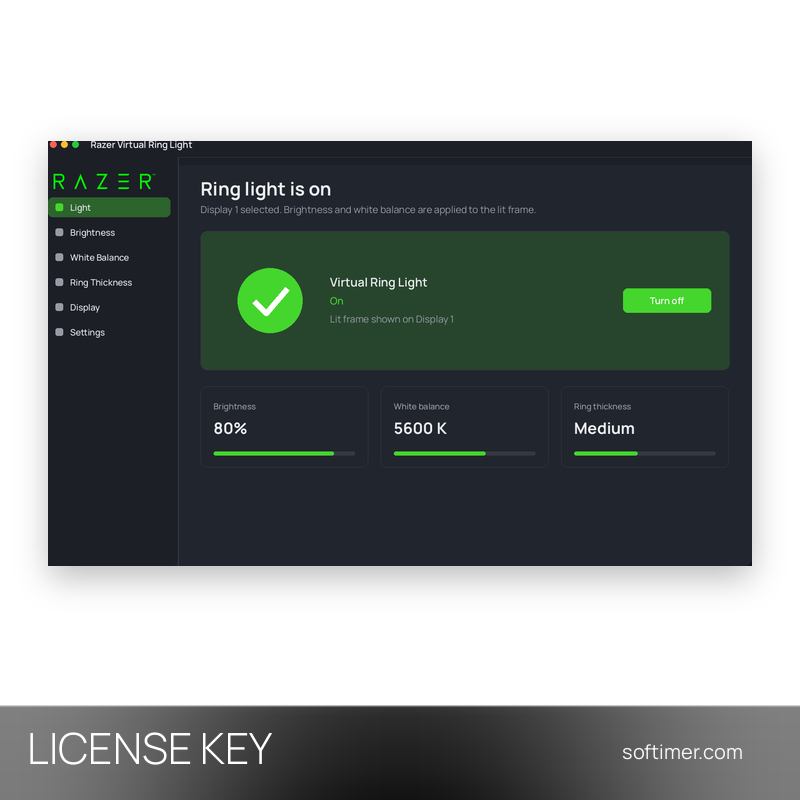
Before a meeting or a stream you switch the light on from the app: a bright frame appears on the chosen monitor while the rest of the screen stays usable, so you can keep the call window or your notes open. Brightness and colour temperature can be adjusted until the image from the webcam looks natural, then left as they are for the next session.
Key Features:
- Screen used as a light source: The app draws an adjustable lit area on the monitor, so the face is lit from the front without buying or placing an external lamp.
- Brightness and white balance: Light intensity and colour temperature can be changed from warm to cool to match the room and the look you want on camera.
- Ring thickness: The width of the lit frame can be increased for more light or reduced to leave more of the screen free for your work.
- Multi-monitor setups: With more than one display you choose which screen emits the light, for example the one closest to the webcam.
- Works with any video app: The light comes from the monitor itself, so it helps in every video call, recording or streaming program you use with your webcam.
Product Details:
- Product: Razer Virtual Ring Light
- Version: current version at the time of purchase
- License Type: license key; duration not stated by the supplier
- Platform: Windows
- Devices: number of users not stated by the supplier
- Language: English
- Delivery: license key and instructions by email after payment confirmation (usually within a few hours)
- Activation: the key is linked to your account with the software vendor (sign in or create one)
- Region: not specified – if you need activation in a specific country, contact us before ordering
- Publisher: Razer Inc.
System Requirements:
- Operating System: Windows 10 or 11 (64-bit)
- Account: Free Razer ID and an Internet connection for activation
How to Activate:
- Download Razer Virtual Ring Light from the Razer website and install it on your Windows PC.
- Start the app and sign in with your Razer ID, or create one for free.
- When the app asks for it, enter the activation code you received to unlock it.
- Choose the monitor, then adjust brightness, white balance and ring thickness.
Delivery:
This product is delivered digitally. After your purchase is confirmed, the license key and activation guidance are sent to the email address provided at checkout. Delivery times may vary depending on the product type.
Same products
- New



- New


- New



- New






- New


Feedback
This product has no reviews. Be the first to review this product!
Share your opinion about the product
This will help other buyers make purchasing decisions
Write a review