


ScreenMaster - License KEY - Windows


- New
ScreenMaster - License Key
ScreenMaster is a small Windows utility from the developer SEASoft for taking screenshots by hand or automatically at a set interval. It suits support staff, IT specialists, authors of manuals and anyone who needs a regular visual record of what happens on a screen, saved without extra clicks. This listing is a registration key that unlocks the program after installation.
This product is a license key for ScreenMaster for use on Windows; the number of users is not stated by the supplier. The supplier does not state the duration of the license, so no specific validity period is guaranteed. The key is delivered by email together with the activation instructions.
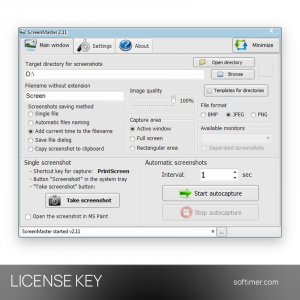
A typical setup: choose a folder, a file name pattern and an interval, start automatic capture and let the program save images in the background, while the tray menu stays available for a quick manual screenshot.
Key Features:
- Automatic capture: Screenshots are taken on their own at any interval from 1 second to 1 hour, and capture pauses while the computer is idle.
- Full screen, window or area: You can capture the whole screen, only the active window or a rectangular area, with support for several monitors saved separately.
- Hotkeys and tray menu: Manual screenshots start from the PrintScreen key, a custom hotkey or the system tray menu, with an optional Save as dialog.
- Flexible saving: Images are stored as JPG, PNG or BMP in a local or network folder, named by number or date and time, or copied to the clipboard.
- Folder maintenance: Old screenshots can be deleted automatically and the folder can be kept under a maximum size, while events are written to a log.
Product Details:
- Product: ScreenMaster
- Version: current version at the time of purchase
- License Type: license key; duration not stated by the supplier
- Platform: Windows
- Devices: number of users not stated by the supplier
- Language: interface languages not stated by the supplier
- Delivery: license key and instructions by email after payment confirmation (usually within a few hours)
- Activation: online, license key entered in the application
- Region: not specified – if you need activation in a specific country, contact us before ordering
- Publisher: SEASoft
System Requirements:
- Operating System: Windows 10, 8, 7, Vista or XP, 32-bit or 64-bit
How to Activate:
- Download the ScreenMaster installer from the developer's website and install the program.
- Start ScreenMaster and open the About tab.
- Enter the registration key you received in the Key field of the Registration section and confirm.
- Check that the program shows it is registered, then set up folder, format and interval in the Main window tab.
Delivery:
This product is delivered digitally. After your purchase is confirmed, the license key and activation guidance are sent to the email address provided at checkout. Delivery times may vary depending on the product type.
Same products




- New


- New

- New


- New

- New


- New



- New
- New

- New


Feedback
This product has no reviews. Be the first to review this product!
Share your opinion about the product
This will help other buyers make purchasing decisions
Write a review