


ScreenFlow 10 - Lifetime License KEY - Mac


- New
ScreenFlow 10 - Perpetual License
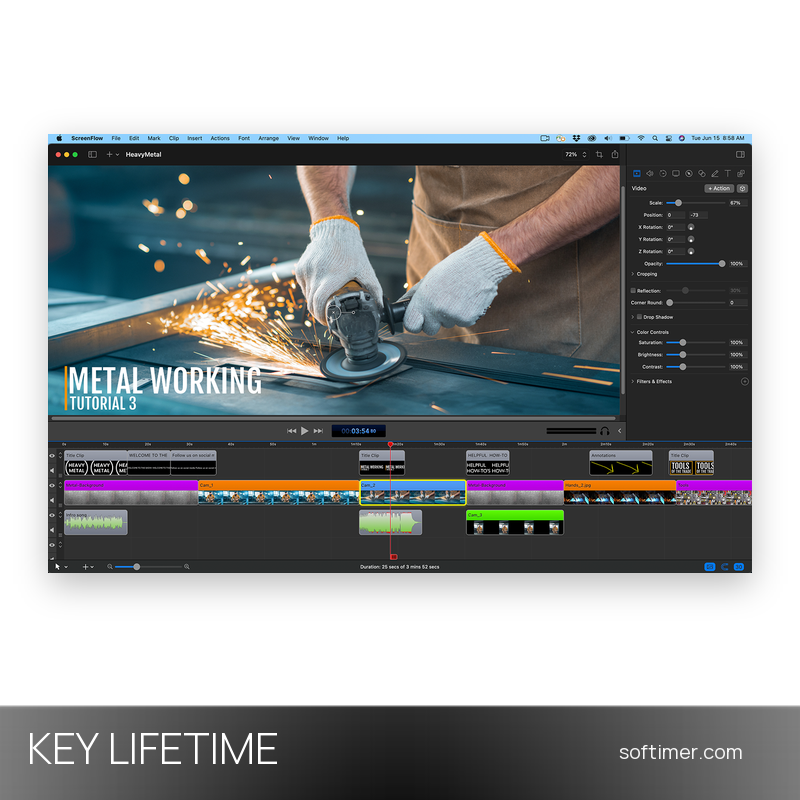
ScreenFlow is the screen recording and video editing application for macOS developed by Telestream: it captures the Mac screen, cameras, microphones and app audio in one recording and opens the result in a multi-track editor. It suits teachers, trainers, marketers, software makers and content creators who produce tutorials, product demos, lessons and presentation videos on a Mac with a single tool. This listing is a license key for the version of ScreenFlow downloaded from the Telestream website: the key unlocks the full application and removes the watermark from exported videos.
This product is a perpetual license key for ScreenFlow 10: it does not expire and can be used on 1 Mac running macOS. The key is delivered by email together with the activation instructions.
A typical project starts with a recording of the screen and webcam, continues in the timeline with cuts, zooms, callouts and a title from the built-in library, and ends with an MP4 or ProRes export or a direct upload to a video platform. Without a license the app works in full but watermarks exported videos, so it can be tried first.
Key Features:
- Screen, camera and audio recording: Records the whole screen, a window or a region together with one or more cameras, microphones and the audio of individual apps, plus the screen of an iPhone or iPad connected by cable.
- Multi-track timeline: Recordings, clips, images and audio tracks sit on separate layers that you trim, split, move and speed up, with transitions, keyframe animations, zoom and pan effects and nested clips.
- Titles, annotations and callouts: A library of animated titles and lower thirds, text and shape annotations, freehand drawing and callouts that highlight the pointer or a region of the screen make tutorials easier to follow.
- Audio and video tools: Multi-channel audio, noise removal, ducking of the background track and audio filters sit next to colour controls, video filters, chroma key and closed-caption support.
- Export and publishing: Exports in MP4, ProRes and other formats, animated GIF and APNG, with presets for web, mobile and social media, and publishes directly to video platforms and cloud services.
Product Details:
- Product: ScreenFlow
- Version: ScreenFlow 10 (current 10.5.x release)
- License Type: perpetual license key, no expiry
- Platform: macOS
- Devices: 1 Mac
- Language: Interface in English, French, German, Japanese and Spanish
- Delivery: license key and instructions by email after the order has been verified (not instant, usually within a few hours)
- Activation: serial number entered in the Licenses pane of the app; it can be deactivated there to move the license to another Mac
- Publisher: Telestream, LLC
- Edition: Download version from the Telestream website (not the Mac App Store version)
System Requirements:
- Operating System: macOS 10.15 Catalina or later on a 64-bit Intel or Apple silicon Mac; the current 10.5 release is tested on macOS 15 Sequoia and macOS 26 Tahoe
- Hardware: At least 4 GB of RAM, 20 GB of free disk space and a graphics card supported by macOS
- Internet: Connection needed to download the app, activate the license and publish videos
How to Activate:
- Download ScreenFlow from the Telestream website and move it into the Applications folder; the Mac App Store version has no field for a serial number.
- Open ScreenFlow, choose Preferences from the ScreenFlow menu and open the Licenses pane; click the lock at the bottom and enter the administrator password of the Mac.
- Click Enter Serial Number, type the license key exactly as received (capital letters and hyphens included) and click Activate: the watermark disappears.
- To move the license to another Mac, click Deactivate Serial Number in the same pane first and wait a few minutes before activating the key on the new computer.
Delivery:
This product is delivered digitally. After your purchase is confirmed, the license key and activation guidance are sent to the email address provided at checkout. Delivery times may vary depending on the product type.
Same products


- New


- New

- New


- New


- New






- New

- New

- New


- New

- New
Feedback
This product has no reviews. Be the first to review this product!
Share your opinion about the product
This will help other buyers make purchasing decisions
Write a review