


TG Pro - 3 Macs / Lifetime License KEY - Mac



- New
TG Pro - Perpetual License
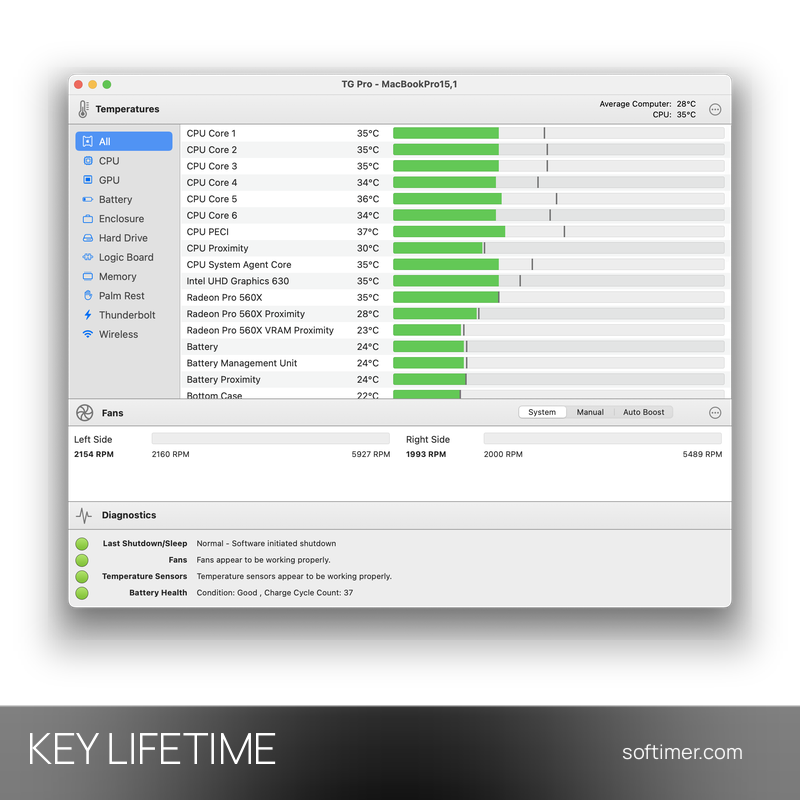
TG Pro is a macOS utility by Tunabelly Software that shows the temperatures of your Mac and lets you control its fans. It is useful for owners of MacBook, iMac, Mac mini and Mac Studio who run heavy workloads such as video editing, 3D rendering, coding or gaming and want to keep an eye on heat and cooling. This listing is a license key that unlocks the full version of TG Pro on your Mac.
This product is a perpetual license key for TG Pro: it does not expire and can be used on 3 Macs running macOS. The key is delivered by email together with the activation instructions.
A common setup keeps TG Pro in the menu bar with the CPU temperature always visible, uses automatic fan rules during long renders and sends a notification when a component gets too hot.
Key Features:
- Temperature monitoring: Real-time readings from CPU, GPU, SSD, battery, logic board, power supply and the other sensors available on your Mac.
- Fan control: Fans can stay under system control, run at a manual speed or follow Auto Boost rules that raise the speed when a temperature threshold is reached.
- Menu bar and alerts: Temperatures and fan speeds are shown in the menu bar, and notifications warn you when a sensor gets too hot.
- Diagnostics: A diagnostics panel reports the last shutdown reason, fan and sensor status and battery health, including the charge cycle count.
- Logging and export: Temperature and fan data can be logged over time and exported to CSV for later analysis.
Product Details:
- Product: TG Pro
- Version: current version at the time of purchase; updates according to the vendor's policy
- License Type: perpetual license key, no expiry
- Platform: macOS (Apple Silicon and Intel)
- Devices: 3 Macs
- Language: English and other languages
- Delivery: license key and instructions by email after the order has been verified (not instant, usually within a few hours)
- Activation: online, license key entered in the application
- Notes: To move the license to another Mac, first deactivate it in TG Pro on the original Mac, then activate it on the new one; problems caused by skipping this step are not covered
- Publisher: Tunabelly Software
System Requirements:
- Operating System: macOS 10.13 High Sierra or later
- Hardware: Mac with Apple Silicon or Intel processor
How to Activate:
- Download TG Pro from the Tunabelly Software website and move it to the Applications folder.
- Open TG Pro and go to the license or registration section of the app.
- Enter the license key you received and confirm to unlock the full version.
Delivery:
This product is delivered digitally. After your purchase is confirmed, the license key and activation guidance are sent to the email address provided at checkout. Delivery times may vary depending on the product type.
Same products


- New




- New

- New






- New


- New


- New


- New




- New


- New




- New


Feedback
This product has no reviews. Be the first to review this product!
Share your opinion about the product
This will help other buyers make purchasing decisions
Write a review