


DAEMON Tools Lite - Lifetime License KEY - Windows


- New
DAEMON Tools Lite - Perpetual License
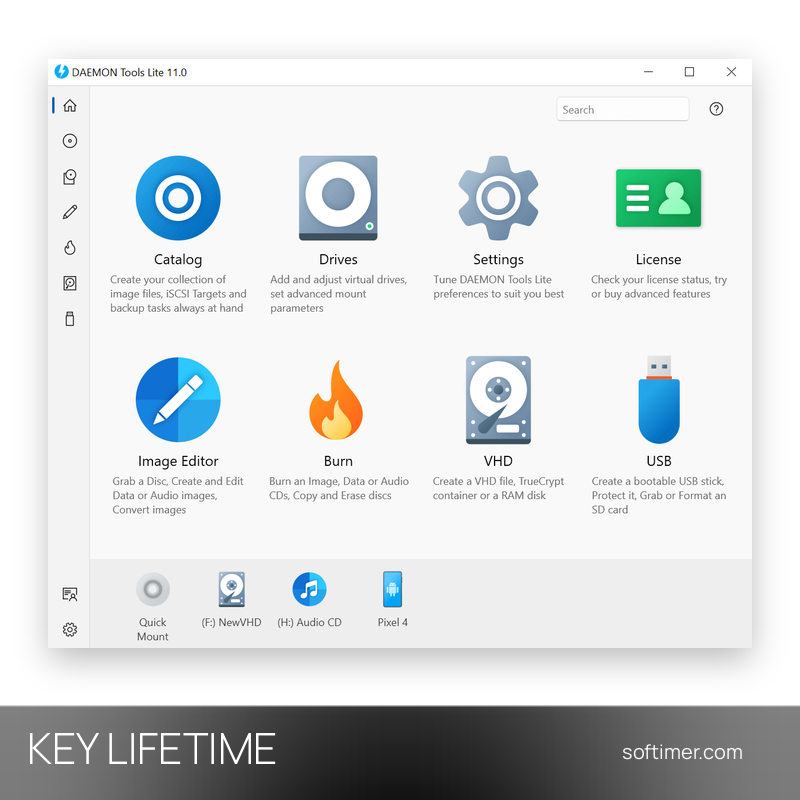
DAEMON Tools Lite is the disk imaging program from Disc Soft that mounts CD, DVD and Blu-ray images on virtual drives, so their content opens as if a real disc were in the computer. It suits anyone who keeps software, archives or media as image files, and it is especially handy on laptops and desktops that no longer have an optical drive. This listing is a license key for the paid version of the program: you install the application from the developer and unlock it by entering the key.
This product is a perpetual license key for DAEMON Tools Lite: it does not expire and can be used on 1 PC running Windows. The key is delivered by email together with the activation instructions.
A typical use is to turn a stack of old installation discs into image files, keep them in the program's catalog and mount the one you need with a double click. Mounted images behave like normal drives, so installers and media players read them without extra steps.
Key Features:
- Image mounting: Opens ISO, MDS/MDF, MDX, NRG, BIN/CUE, CCD, ISZ and other common image formats on virtual drives with a double click or from the program window.
- Virtual drives: Creates several virtual drives at the same time and lets you choose how each one behaves when an image is mounted.
- Image creation: Copies a physical disc into an image file, with optional compression and password protection of the resulting image.
- Image catalog: Keeps all your image files in one list with search, so frequently used images are always at hand.
Product Details:
- Product: DAEMON Tools Lite
- Version: current version at the time of purchase; updates according to the vendor's policy
- License Type: perpetual license key, no expiry
- Platform: Windows
- Devices: 1 PC
- Language: Multilingual (English, German, French, Italian, Russian and other languages)
- Delivery: license key and instructions by email after payment confirmation (usually within a few hours)
- Activation: online, license key entered in the application
- Region: not specified – if you need activation in a specific country, contact us before ordering
- Publisher: Disc Soft
How to Activate:
- Download DAEMON Tools from the developer's website and install it on your computer.
- Open the program and go to the License section.
- Enter the license key you received and confirm the activation.
- Restart the program if asked: the paid features are then available.
Delivery:
This product is delivered digitally. After your purchase is confirmed, the license key and activation guidance are sent to the email address provided at checkout. Delivery times may vary depending on the product type.
Same products



- New



- New




- New

- New




- New



- New




- New
Feedback
This product has no reviews. Be the first to review this product!
Share your opinion about the product
This will help other buyers make purchasing decisions
Write a review