


DisplayBuddy - Lifetime License KEY - Mac


- New
DisplayBuddy - Perpetual License
DisplayBuddy is a macOS utility that lets you adjust the settings of external monitors directly from the Mac instead of using the buttons and menus on the screen itself. It suits anyone who works with one or more external displays, from designers and developers to office users, and wants brightness, contrast and other settings within reach of the menu bar or keyboard. This listing is a license key that unlocks the full version of the application downloaded from the developer's website.
This product is a perpetual license key for DisplayBuddy: it does not expire and can be used for 1 user running macOS. The key is delivered by email together with the activation instructions.
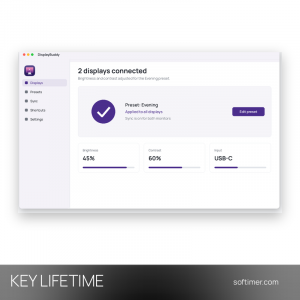
A typical use is a MacBook connected to one or two external monitors: DisplayBuddy sits in the menu bar, lowers the brightness of every screen in the evening with one preset and raises it again in the morning, without reaching for the monitor buttons.
Key Features:
- Brightness and contrast: Brightness and contrast of external monitors are changed from the Mac, with support for most common monitor brands.
- Volume and input source: On monitors that expose these controls, speaker volume and the active input can also be adjusted from the app.
- Several monitors: Each connected display can be controlled on its own, or several displays can be kept in sync.
- Presets: Saved presets store a set of values for a task or time of day and apply them to your monitors in one step.
- Menu bar and shortcuts: Controls are available from a compact menu bar menu and through keyboard shortcuts, with light use of system resources.
Product Details:
- Product: DisplayBuddy
- Version: current version at the time of purchase; updates according to the vendor's policy
- License Type: perpetual license key, no expiry
- Platform: macOS
- Devices: 1 user
- Language: Multilingual (English, German, French, Italian, Russian and other languages)
- Delivery: license key and instructions by email after the order has been verified (not instant, usually within a few hours)
- Activation: online, license key entered in the application
- Region: not specified – if you need activation in a specific country, contact us before ordering
System Requirements:
- Operating System: macOS
- Monitor: External display; hardware controls require a monitor that supports DDC/CI
How to Activate:
- Download DisplayBuddy from the developer's website and move it to the Applications folder.
- Open the app and go to the license or activation window.
- Enter the license key received with the order and confirm to unlock the full version.
Delivery:
This product is delivered digitally. After your purchase is confirmed, the license key and activation guidance are sent to the email address provided at checkout. Delivery times may vary depending on the product type.
Same products


- New


- New



- New

- New


- New

- New


- New


- New


Feedback
This product has no reviews. Be the first to review this product!
Share your opinion about the product
This will help other buyers make purchasing decisions
Write a review