


TaskPaper 3 - Lifetime License KEY - Mac

- New
TaskPaper 3 - Perpetual License
TaskPaper is a to-do list application for macOS developed by Hog Bay Software: your lists are ordinary text files in which a project ends with a colon, a task starts with a dash and any other line is a note, and the app formats them as you type. It is made for people who prefer a fast, keyboard-driven outliner to a heavy task manager and who want their data to stay readable in any text editor, on any device and in years to come. This listing is a license key for the direct download version of TaskPaper from the developer's website: the key unlocks the full version after the trial and covers the updates of the current major version 3.
This product is a perpetual license key for TaskPaper 3: it does not expire and can be used on 1 Mac running macOS. The key is delivered by email together with the activation instructions.
A typical setup is one file per area of life or per client, kept in a folder synced through iCloud Drive or Dropbox: a today tag, a due tag with a date and the saved searches in the sidebar turn a long outline into short lists for the day, while the same files open in any text editor or in other apps that read the TaskPaper format.
Key Features:
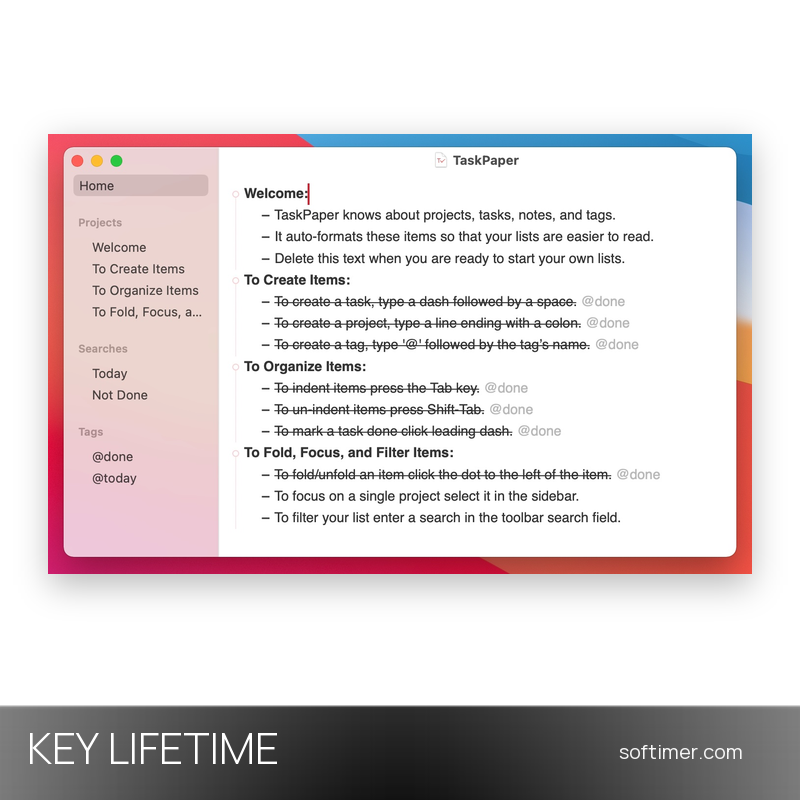
- Plain text that formats itself: Type a colon at the end of a line to create a project, a dash to add a task or an at sign to attach a tag; TaskPaper recognises the structure and styles it, with no hidden markup and no proprietary database.
- Tags and saved searches: Every item can carry tags with optional values; the search field and the saved searches in the sidebar filter the outline with a simple query language, for example everything that is not marked as done.
- Fold, focus and filter: Long lists stay manageable by folding branches, focusing on a single project from the sidebar or filtering by tag, type or content; tabs and the Go to Anything palette move you between projects in a moment.
- Dates and Reminders: Dates and times are written in plain text and can be inserted from a calendar; lists can be imported from and exported to the macOS Reminders app, so tasks dictated to Siri end up in your TaskPaper document.
- Themes and scripting: The look is defined by LESS/CSS stylesheets with Dark Mode support, and a JavaScript API plus AppleScript access let you automate repetitive work; a community wiki collects ready-made themes and scripts.
Product Details:
- Product: TaskPaper
- Version: 3 (3.9.x; updates within version 3 included)
- License Type: perpetual license key, no expiry
- Platform: macOS
- Devices: 1 Mac
- Language: English interface; documents in any language
- Delivery: license key and instructions by email after the order has been verified (not instant, usually within a few hours)
- Activation: license key entered in the app (TaskPaper menu, License), checked online; the license can be deactivated from the same window before moving to another Mac
- Publisher: Hog Bay Software
- Edition: license for the direct download version from the developer's website (the Mac App Store version is a separate product)
System Requirements:
- Operating System: macOS 11 Big Sur or later; Intel and Apple silicon Macs (universal app)
- Storage: A few megabytes of disk space; documents are small plain text files
- Internet: Needed to check the license key at activation and, if you use them, for iCloud Drive or Dropbox sync of your files
How to Activate:
- Download TaskPaper from the developer's website, move it to the Applications folder and open it; the app runs as a free trial for a short period.
- Open the TaskPaper menu in the menu bar and choose License.
- Enter the license key received by email and confirm; an internet connection is needed for the check.
- The trial notice disappears at once; the same window lets you deactivate the license before you replace or move to another Mac.
Delivery:
This product is delivered digitally. After your purchase is confirmed, the license key and activation guidance are sent to the email address provided at checkout. Delivery times may vary depending on the product type.
Same products


- New


- New



- New
Feedback
This product has no reviews. Be the first to review this product!
Share your opinion about the product
This will help other buyers make purchasing decisions
Write a review