


BetterDisplay Pro - Lifetime License KEY - Mac
- New
BetterDisplay Pro - Perpetual License
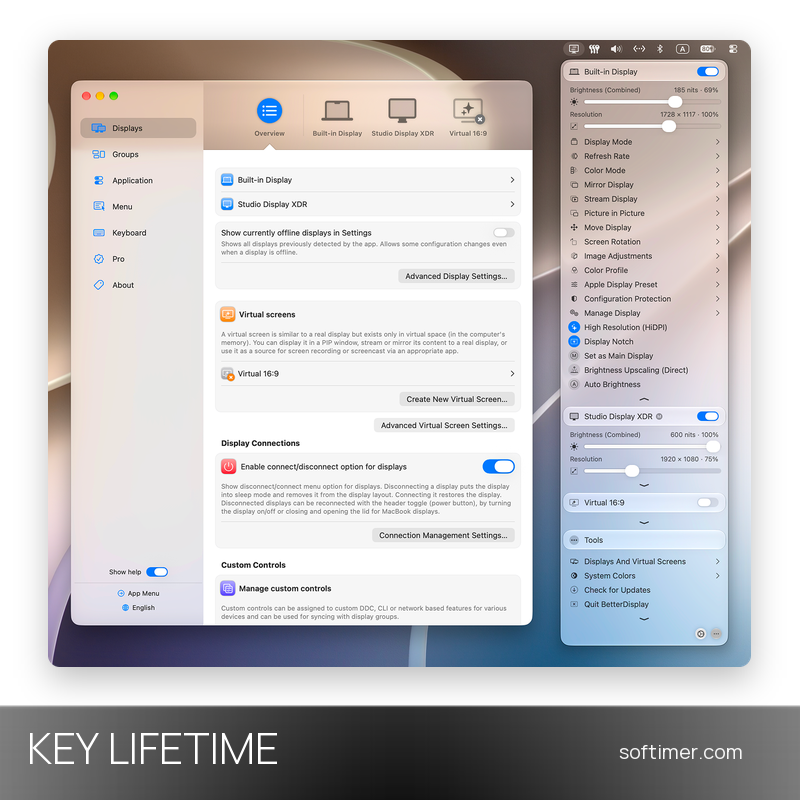
BetterDisplay is a display management utility for macOS developed by Kodeon Software: it sits in the menu bar and controls resolution, scaling, brightness, color and arrangement of the built-in screen and of external monitors. It is aimed at people who work with external displays, XDR and HDR screens, multi-monitor setups or headless Macs and want options that macOS itself does not offer, such as custom HiDPI resolutions, extra brightness and virtual screens. This listing is a license key for BetterDisplay Pro: the code unlocks the Pro feature set in the app downloaded from the developer's website, on top of the functions that stay free for non-business use.
This product is a perpetual license key for BetterDisplay Pro: it does not expire and can be used on 1 Mac running macOS. The key is delivered by email together with the activation instructions.
A typical setup is a MacBook with one or two external monitors: BetterDisplay adds the scaled resolutions that macOS hides and keeps arrangement and settings from being reset when a display is reconnected.
Key Features:
- Flexible HiDPI scaling: Makes the built-in screen and natively connected displays fully scalable with custom HiDPI resolutions beyond the macOS presets, also on notched and HDR screens.
- XDR/HDR brightness upscaling: Unlocks additional brightness on compatible Apple XDR displays and natively connected HDR monitors, above the level macOS normally allows.
- Brightness, volume and DDC control: Adjusts brightness, volume and input of DDC-capable external monitors from the menu bar, with sliders and keyboard shortcuts, plus software dimming down to black on any display.
- Connection management and layout protection: Disconnects and reconnects displays without unplugging them, turns off the built-in screen when an external monitor is attached on Apple silicon and protects arrangement, resolution and color profile.
- Virtual screens and picture-in-picture: Creates virtual displays with custom resolutions and aspect ratios, for example for headless Macs, and shows any display in a PIP window or streams it to another screen.
- Color, image adjustments and automation: Selects color modes and profiles, applies sharpening, geometry and color filters with custom 3D LUTs and can be scripted via command line, macOS Shortcuts and HTTP.
Product Details:
- Product: BetterDisplay Pro
- Version: current major version (earlier releases available for older macOS); at least one year of updates included, major upgrades included
- License Type: perpetual license key, no expiry
- Platform: macOS
- Devices: 1 Mac
- Language: Multilingual (38 languages, including English, German, French, Italian and Russian)
- Delivery: license key and instructions by email after the order has been verified (not instant, usually within a few hours)
- Activation: online, license key entered in the Pro section of the app settings; it can be deactivated there and moved to another Mac
System Requirements:
- Operating System: macOS 26 Tahoe (26.3 or later) or macOS 27 for the current version 5; version 4 for Ventura 13.2, Sonoma and Sequoia; older releases for earlier systems
- Processor: Apple silicon or Intel Mac; some features depend on the Mac model, the display and the macOS version
- Display: XDR/HDR brightness needs a compatible Apple XDR or natively connected HDR display; hardware controls need a DDC-capable monitor and connection
How to Activate:
- Download the release for your macOS version from the developer's website or GitHub and drag BetterDisplay to the Applications folder.
- Open BetterDisplay: its icon appears in the menu bar; open the app menu and click the gear icon to reach Settings.
- In the Pro section of Settings choose the license activation and enter the key received by email; an internet connection is needed for the check.
- The Pro features unlock at once; to move the license to another Mac, click Deactivate License in the same section first.
Delivery:
This product is delivered digitally. After your purchase is confirmed, the license key and activation guidance are sent to the email address provided at checkout. Delivery times may vary depending on the product type.
Same products




- New


- New



- New


Feedback
This product has no reviews. Be the first to review this product!
Share your opinion about the product
This will help other buyers make purchasing decisions
Write a review