


CorelDRAW Technical Suite 2025 - Lifetime License KEY - Windows
- New
CorelDRAW Technical Suite 2025 - Perpetual License
CorelDRAW Technical Suite is the technical illustration package developed by Corel (part of Alludo): it adds Corel DESIGNER, the 3D viewer XVL Studio Corel Edition and a library of engineering symbols to CorelDRAW and Corel PHOTO-PAINT. It is used by technical illustrators, manufacturers and documentation teams that produce assembly instructions, maintenance manuals, spare parts catalogues and exploded views from CAD data. What you buy is a license key for the suite version named in the title: the installers are downloaded from the Corel website and the applications are unlocked with the key, following the instructions delivered with it.
This product is a perpetual license key for CorelDRAW Technical Suite 2025: it does not expire and can be used on 1 PC running Windows. The key is delivered by email together with the activation instructions.
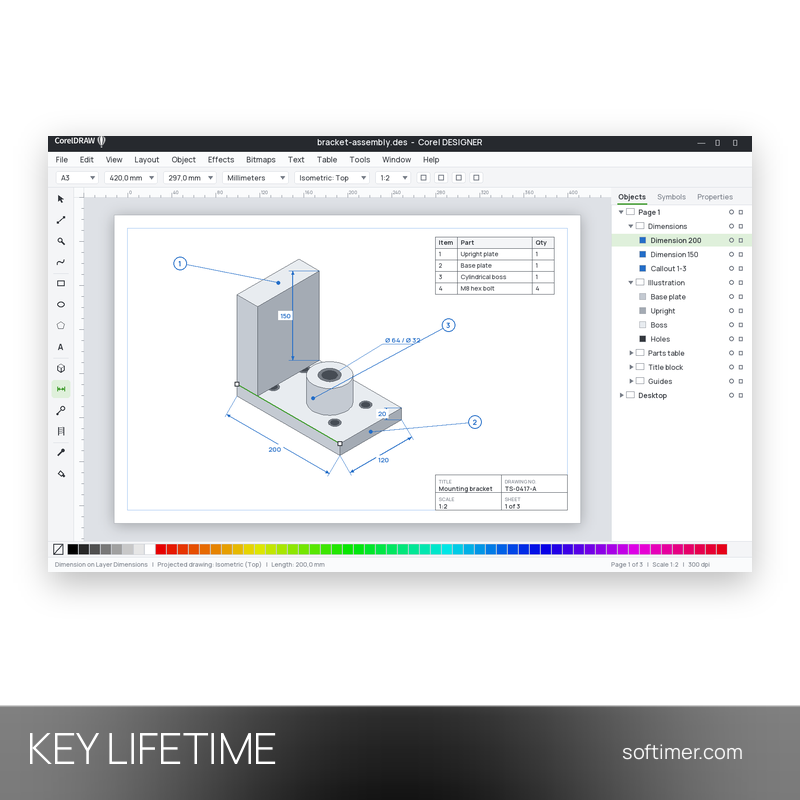
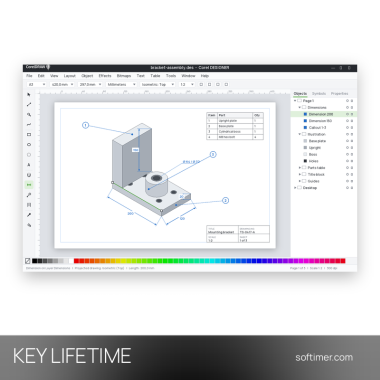
A typical project starts with a 3D model: XVL Studio opens it, the chosen view goes to Corel DESIGNER as vector outlines, dimensions and callouts are added and the pages are exported for print, web portals and S1000D or DITA publishing systems.
Key Features:
- Corel DESIGNER for technical illustration: Projected drawing modes for isometric and other axonometric views, precise object placement, drawing scale control and an Equation Editor for formulas in the documentation.
- Dimensions, callouts and symbols: Dimension tools that follow the drawing scale, numbered callouts with leader lines and hotspots for interactive parts lists, plus about 4,000 industry symbols and ANSI, DIN and ISO templates.
- 3D CAD repurposing with XVL Studio: XVL Studio opens 3D models, sections and explodes assemblies and sends the view to Corel DESIGNER as editable vector lines; native import of CATIA, SOLIDWORKS or Inventor files belongs to the separate 3D CAD edition and is not included.
- CorelDRAW and Corel PHOTO-PAINT included: The vector design and layout application and the layer-based photo editor of the Graphics Suite are part of the package for covers, marketing visuals and retouched product photos.
- Standards-based publishing: Exports to CGM (WebCGM and S1000D profiles), SVG, PDF, DWG and DXF, 3D PDF output from XVL Studio and text exchange with translation memory systems through XLIFF files.
Product Details:
- Product: CorelDRAW Technical Suite (Corel DESIGNER, CorelDRAW, Corel PHOTO-PAINT, XVL Studio Corel Edition, Corel Font Manager, CAPTURE)
- Version: 2025
- License Type: perpetual license key, no expiry
- Platform: Windows
- Devices: 1 PC
- Language: Multilingual (English, German, French, Italian, Russian and other languages)
- Delivery: license key and instructions by email after payment confirmation (usually within a few hours)
- Activation: the key is linked to your account with the software vendor (sign in or create one)
- Region: not specified – if you need activation in a specific country, contact us before ordering
- Publisher: Corel Corporation (Alludo)
System Requirements:
- Operating System: Depends on the version in the title: 2021 and later need Windows 10 or 11 (64-bit); 2017-2020 run on Windows 7 SP1, 8.1 or 10 and are not officially supported on Windows 11
- Hardware: Recent versions need an Intel Core i3 or AMD Ryzen processor, 8 GB of RAM, about 9 GB of disk space and an OpenCL 1.2 graphics card with 3 GB of video memory; older versions need less
- Internet: Required to install the suite and authenticate the license; some included components and online content also need a connection
How to Activate:
- Download the installer for the version of the suite named in the title from the Corel website and run it.
- Sign in with your Corel account when the program asks for it (create one for free if you do not have one): recent versions require it to authenticate the license.
- Start Corel DESIGNER or CorelDRAW and enter the serial number received by email when the program asks for it, following the instructions delivered with the key.
- Once the license has been verified online the applications are unlocked; keep the serial number and the instructions for a later reinstallation.
Delivery:
This product is delivered digitally. After your purchase is confirmed, the license key and activation guidance are sent to the email address provided at checkout. Delivery times may vary depending on the product type.
Same products


- New

- New



- New

- New
- New


- New

- New


- New
- New




- New
Feedback
This product has no reviews. Be the first to review this product!
Share your opinion about the product
This will help other buyers make purchasing decisions
Write a review