


ReadCube Papers Standard - 1 Year ACTIVATION on your account - Multi-platform

- New
ReadCube Papers Standard - 1 Year Upgrade
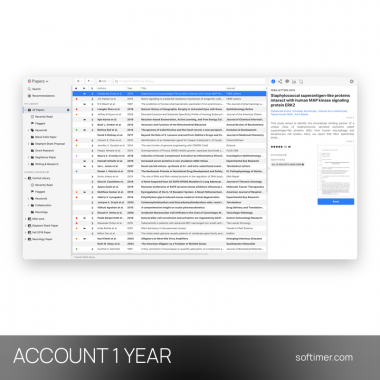
ReadCube Papers is the reference manager and PDF reader developed by ReadCube, a Digital Science company: it gathers articles, books and PDFs in a single personal library, completes their bibliographic data automatically and keeps everything synchronised between computer, browser and mobile devices. It is intended for students, PhD candidates, researchers and clinicians who read a lot of scientific literature and need to find, annotate and cite their sources quickly while writing papers, theses or grant proposals. The purchase is a subscription to the paid plan of the service, linked to your ReadCube account: once it is active, the same account unlocks the desktop apps for Windows and macOS, the web app and the mobile apps.
This product activates ReadCube Papers Standard for 1 year on your own account (a free account with the service is enough, unless the details say otherwise): after payment we apply the subscription to the account you indicate, usable for 1 user (Windows, macOS, iOS, Android and web browser).
A typical session starts with a search from inside the app or a click on the browser extension while reading a journal website: the article and its PDF land in the library with complete metadata, you read and highlight it in the built-in viewer and, when it is time to write, SmartCite inserts the citation and the bibliography directly in Microsoft Word or Google Docs.
Key Features:
- Library and automatic metadata: Imported PDFs are matched against publisher databases, so title, authors, journal, year and DOI are filled in automatically; lists, tags and smart lists keep even large collections in order.
- Enhanced PDF reader: Highlights, notes and drawings are saved together with the article; the reader shows references, related articles and figures without leaving the document.
- Search and recommendations: Search PubMed, Google Scholar and other sources from inside the app, get suggestions based on what is already in your library and follow new publications on your topics.
- SmartCite: The citation add-in for Microsoft Word and Google Docs inserts in-text citations and generates the bibliography in thousands of citation styles, including APA, MLA, Chicago and journal formats.
- Sync and shared libraries: The library, PDFs and annotations are stored in the cloud and kept in sync across desktop, web and mobile apps; shared libraries let you collect and discuss papers with colleagues.
Product Details:
- Product: ReadCube Papers
- Version: current versions of the apps for all supported platforms
- License Type: upgrade applied to your own account, 1 year
- Duration: 1 year
- Platform: Windows, macOS, iOS, Android and web browser
- Devices: 1 user
- Language: English interface; documents and references in any language
- Delivery: the subscription is applied to your own account: after payment we ask for the e-mail address of your account, never your password, and confirm by email when the upgrade is done
- Region: not specified – if you need activation in a specific country, contact us before ordering
- Publisher: ReadCube (Digital Science)
System Requirements:
- Operating System: Windows 10 or 11 and current macOS versions for the desktop apps; apps for iOS and Android; web app in a current browser
- Account: A free ReadCube account (e-mail address) to which the subscription is linked
- Internet: Connection required for sync, search, SmartCite and the AI assistant
How to Activate:
- Create a free account on the ReadCube website or sign in to the one you already use: the subscription is linked to this account.
- Apply the license key received by e-mail to the account by following the instructions delivered with it (if the subscription is activated directly on your account, you only need to provide the account e-mail address).
- Download the desktop app for Windows or macOS from the ReadCube website, install it and sign in with the same account; do the same in the mobile apps and in the SmartCite add-in.
- The library syncs automatically; you can check the active plan and its expiry date at any time in the account settings.
Delivery:
This product is delivered digitally as an activation on your own account: no license key is sent. After your purchase is confirmed, we contact you at the email address provided at checkout to ask for the e-mail address of your account with the service, never the password, and we confirm by email once the subscription is active on your account.
Same products


- New

- New

- New


- New


- New



- New


- New

- New


- New

- New


- New


- New

Feedback
This product has no reviews. Be the first to review this product!
Share your opinion about the product
This will help other buyers make purchasing decisions
Write a review